Many engineers begin learning Terraform by placing everything inside a single main.tf file. This approach works well for understanding syntax and basic resource creation. However, as soon as infrastructure grows beyond a few resources, single-file Terraform projects become difficult to maintain, risky to change, and nearly impossible to scale safely.
Production environments demand far more than working code. They require clarity, reusability, governance, and predictable behavior during change. This is where the real transition happens, moving from learning Terraform to engineering with Terraform.
In this hands-on project tutorial, I moved beyond basic resource definitions and focused on designing modular, production-ready Infrastructure as Code (IaC). The goal was to reflect how Cloud Engineers, DevOps Engineers, and SRE teams actually design and operate scalable, resilient Azure platforms in real environments.
If you’re still early in your Azure journey, you may find it helpful to first review Setting Up Clean Azure VNets, Subnets & Tagging, which explains the network and governance foundations used throughout this lab.
Architecture Overview: What We’re Building
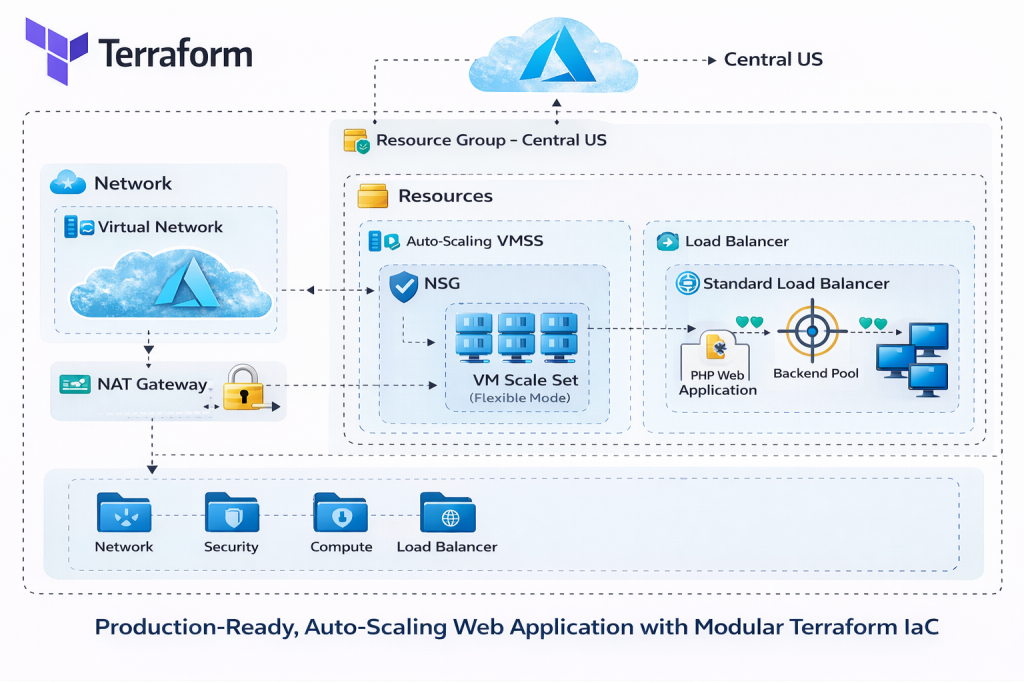
At the core of this project is a fully automated, auto-scaling Azure web application, deployed end-to-end using modular Terraform.
Rather than focusing on a single Azure service, this lab demonstrates how multiple infrastructure layers work together to deliver scalability, security, and reliability.
Core Architecture Components
The solution includes:
- Azure Virtual Network (VNet) providing network isolation
- Dedicated subnets separating compute resources from other network layers
- Network Security Groups (NSGs) enforcing least-privilege inbound and outbound access
- NAT Gateway ensuring secure and predictable outbound internet connectivity
- Standard Azure Load Balancer distributing inbound traffic
- Azure VM Scale Set (Flexible orchestration mode) enabling horizontal scaling and fault tolerance
- PHP web application, bootstrapped automatically on each VM using
cloud-init
Design decisions emphasize fault tolerance, horizontal scalability, and clear separation of concerns. Each layer has a single responsibility, reducing blast radius and simplifying troubleshooting.
For a deeper explanation of how Azure networking is designed and validated in production, see Azure Networking with PowerShell: VNet Design, Peering, VM Provisioning & Network Watcher.
Why Modular Terraform Matters in Production
Terraform modules are not about splitting files; they are about isolating responsibility.
In real environments:
- Different teams often own different layers (networking, security, compute)
- Changes must be scoped and predictable
- Reuse across environments (dev, test, prod) is essential
By designing with modules, you create guardrails, not just code.
This approach aligns naturally with Azure governance best practices, including consistent tagging, naming standards, and controlled blast radius. If governance is new to you, review Azure Policy, Tags, and Resource Locks Explained: A Complete Governance Guide for Cloud Engineers before expanding this lab further.
Project Structure: Modular Terraform Layout
Rather than placing all resources into one file, the infrastructure is organized into purpose-built Terraform modules, each responsible for a single layer of the system.
High-Level Structure
modules/network- networking and outbound connectivitymodules/security- network security and governance controlsmodules/loadbalancer- traffic distribution and health checksmodules/compute- VM Scale Set and auto-scaling logicenvironments/prod- environment-specific configuration and orchestration
Each module exists to encapsulate responsibility, not just to group files. This approach allows teams to change one part of the system without unintentionally impacting others.
Each module exists to solve a specific problem, not just to group files.
Module Responsibilities
- Network module Owns VNet creation, subnet design, routing, and outbound connectivity (including NAT Gateway)
- Security module Enforces NSGs, least-privilege rules, and governance-aligned access controls
- Load balancer module Handles inbound traffic distribution, health probes, and backend pool association
- Compute module Manages the VM Scale Set, auto-scaling rules, and cloud-init bootstrapping
- Environment layer Wires modules together and applies environment-specific configuration
This structure makes the codebase safer to change, easier to reason about, and reusable across multiple environments.
This structure makes the codebase easier to reason about, safer to change, and reusable across environments.
🎥 Video Walkthrough
What I Demonstrated in the Video
This project tutorial is fully broken down in the accompanying video walkthrough.
Auto-Scaling Compute with Azure VM Scale Sets
The application layer is built using Azure VM Scale Sets (flexible mode).
Why Flexible Mode?
Flexible orchestration provides:
- Zone awareness
- Better fault isolation
- Greater control over instance behavior
- Compatibility with Standard Load Balancer
Each VM instance is bootstrapped automatically using cloud-init a script, which installs the PHP runtime and application dependencies during provisioning. This ensures consistent, repeatable builds without manual intervention.
For teams that want even stronger consistency guarantees, combining VMSS with custom images is common. See Building Golden Images with Azure Compute Gallery: Custom VM Image Creation & Deployment for a deeper dive.
Traffic Flow and Load Balancing
Inbound traffic is handled by a Standard Azure Load Balancer, configured with:
- Frontend IP configuration
- Backend address pool (VMSS instances)
- Health probes to detect unhealthy nodes
- Load-balancing rules for HTTP traffic
The load balancer distributes traffic evenly across healthy VM instances, while auto-scaling policies ensure capacity grows and shrinks based on demand.
This model mirrors the same traffic patterns used in many production Azure web platforms.
Secure and Predictable Networking
Security and networking are treated as first-class citizens, not afterthoughts.
Key Networking Principles Applied
- Subnet isolation prevents accidental exposure
- NSGs enforce least-privilege rules, limiting access to required ports only
- NAT Gateway ensures predictable outbound IP addresses, which is critical for:
- External API allow-listing
- Security monitoring
- Compliance requirements
This approach aligns with best practices used across enterprise Azure environments.
If you want to explore secure infrastructure patterns using declarative templates, review Build a Secure Azure Environment in Minutes with Bicep: VMs, Networking, Private Endpoints & Blob Replication.
Terraform Best Practices Applied
Several production-grade Terraform practices are used throughout the project:
- Modular structure for scalability and reuse
- Variables and locals to enforce DRY patterns
- Variable validation to prevent invalid inputs
- Version pinning for Terraform and providers to ensure stability
- Remote backend using Azure Blob Storage for shared state management
- Consistent naming and tagging for governance and cost tracking
Remote state is essential for collaboration and safety. For a deeper look at Azure storage security in this context, see Securing Azure Blob Storage with PowerShell: Network Isolation, SAS Access & Immutable Policies.
Observability and Validation
Once deployed, infrastructure should not be trusted blindly.
Scaling behavior and availability can be validated directly in the Azure Portal, while metrics and alerts provide ongoing visibility.
To take this further in real environments, integrate monitoring using How to Set Up Azure Monitor Alerts, Action Groups, and Processing Rules (Step-by-Step Guide) so scaling and availability issues are detected automatically.
Source Code and Repository
The complete Terraform configuration used in this lab is available on GitHub.
💡 Tip: Clone the repository before starting the lab so you can follow along step by step and experiment safely in your own Azure subscription.
👉 GitHub Repository https://github.com/sirhumble07/azure-vmss-load-balanced-scalable-webapp-terraform
Repository Includes
- Modular Terraform code (network, security, load balancing, compute)
- VM Scale Set configuration with auto-scaling
cloud-initscripts for application bootstrapping- Azure Blob Storage remote backend configuration
- Environment-specific variables and outputs
Cloning the repository and reviewing it alongside this tutorial will help you understand how production Terraform projects are structured in practice.
Deployment Workflow
Deployment follows the standard Terraform lifecycle:
terraform initInitializes providers and configures the remote backendterraform planPreviews changes before anything is appliedterraform applyProvisions the full environment
After deployment, scaling behavior can be tested under load and validated through the Azure Portal and metrics dashboards.
Cleanup and Cost Control
Labs should always be designed with teardown in mind.
Safe Teardown
terraform destroyThis cleanly removes all managed resources, ensuring no orphaned infrastructure remains.
Cost Governance Mindset
Destroying unused environments reinforces cost awareness, an essential habit in professional cloud engineering. Technical excellence includes both engineering correctness and financial responsibility.
Final Thoughts
This project represents a shift from basic Terraform usage to production-ready Infrastructure as Code. By applying modular design, governance principles, and real Azure architecture patterns, you build systems that scale safely and evolve predictably.
If you’re serious about cloud engineering, this is the level of thinking that moves you from lab builder to platform engineer.